

Key facts
- A failed charging session can have payment, connector, vehicle, network or charger-side causes.
- Drivers should stop at visible electrical hazards and never bypass charger fault protection.
- A live map status is useful but cannot guarantee a port will work on arrival; plan a compatible alternative.
Quick answer: If a public EV charger will not start, first check for a visible safety problem; then verify the port is compatible, confirm the charging session was authorized and follow the vehicle and charger on-screen instructions. If the problem persists, call the operator using the support number on the unit or in its official app, and move to a verified backup charging location when practical. Do not open the charger, bypass a fault or manipulate electrical connectors to force a session.
Drivers sometimes assume a failed session means the whole location is permanently broken. In reality, a start failure may involve a vehicle setting, connector communication, authorization, payment processing, a damaged unit or a network outage. The U.S. Joint Office of Energy and Transportation’s ChargeX reliability work addresses payment, user interfaces, communication and fault diagnosis as separate problems. That distinction helps you choose a sensible next step without guessing.
At the charger: use this seven-step checklist
- Stop if there is a safety concern. Do not touch visibly damaged contacts, exposed wires, a broken cabinet, damaged connector or equipment surrounded by dangerous water or traffic conditions. If there is an immediate electrical hazard, move away and use local emergency channels where appropriate.
- Read the unit’s status. Check whether the specific port says available, unavailable, reserved, maintenance, out of service or awaiting authorization. A location may contain several ports with different states.
- Confirm physical and vehicle compatibility. Check the exact connector type and whether the vehicle supports the charging mode. An adapter must be approved for the specific car, station and charging direction; merely fitting the connector does not guarantee a session.
- Use the intended start sequence. Some stations require app, RFID, contactless card or Plug & Charge authorization before or after inserting the connector. Follow instructions for that network and vehicle; do not assume that all stations start the same way.
- Check the car’s own settings. A scheduled-charge setting, charging limit, battery management state or fault notification may prevent charging. Consult the owner’s manual for that model rather than attempting undocumented resets.
- Record the error and request support. Photograph the station ID and any message if safe, note the time and port number, and contact the operator’s official support channel. A support agent may be able to check remote diagnostics or advise a different port.
- Use a backup when available. Verify the alternative’s connector, access hours, payment requirements and current status. Never drain your battery to reach an uncertain single charger if a safer nearby option exists.
The Joint Office’s ChargeX error-code overview specifically identifies payments, broken parts, software failures and incompatible connections as causes of charging frustration. This article is a driver’s safe decision framework, not a method for servicing charger electronics.
What the charger says—and what it may mean
| What you observe | What to check safely | When to stop and contact support |
|---|---|---|
| “Payment failed” or authorization rejected | Confirm the official app or card, station ID, account state and permitted payment methods | Repeated rejection or an unexplained charge/hold |
| “Preparing” but zero power | Check vehicle message and official station instructions; allow the normal start sequence | Persistent no-power state or fault notification |
| Connector will not latch | Check it is the approved connector and the vehicle’s normal inlet state | Anything damaged, obstructed or requiring force |
| Station shown “available” in an app but not working | Confirm the live status for that exact port, not merely the location | Out-of-service display, repeated failed sessions |
| Charging starts but quickly stops | Check the vehicle’s charge limit, notifications and any time limit | Repeated unexpected stops, overheating or hardware warnings |
| Charging is much slower than the sign says | Consider vehicle-side battery conditions, SOC and actual charger capability | Power far below expectations with a fault message or repeated abnormal behavior |
These are prompts for diagnosis, not conclusive explanations. Two identical screen messages may originate from different underlying causes. The ChargeX program exists partly to make fault reporting and communication more consistent.
Payment failed: should you keep trying?
A payment or authorization failure does not necessarily mean the credit card is invalid. It may involve network communications, a reader, account authorization, membership rules or a temporary service problem. First use the operator’s documented payment procedure. If an app requires a station number, verify it matches the unit you are actually standing beside.
Avoid making a series of uncontrolled payment attempts when the first results are unclear. Check the app and payment account for pending holds, then ask the operator whether the initial session was authorized. If funds were captured without delivered charging, keep the receipt or transaction reference for customer support. Do not enter payment details into an unofficial QR code or a link pasted over a charger label.
Plugged in but not charging: check the vehicle as well
The vehicle and station communicate before energy transfer. A vehicle may refuse power due to its own configuration or a genuine fault; a station may also reject a connector or network authorization. If your car shows a message, consult its owner’s manual or manufacturer support. Do not assume that unplugging an energized cable or defeating a latch is safe.
Understand that a station’s advertised maximum kW is not a promise to your vehicle. Actual power depends on station capability, power sharing, vehicle limits, battery state of charge and temperature. Our EV charging connectors and levels guide explains why plug shape, charging type and network permission are separate.
How to choose a usable backup charger
Use the federal Alternative Fueling Station Locator for a geographic overview, then check the operator’s current status information for individual ports. The AFDC explains that a location, a charging port and a connector are not identical concepts; a location with several plugs may not have the number of simultaneously usable ports you expect. Read its charging-station terminology guide.
For every backup, verify these five things before driving there:
- Connector and vehicle authorization compatibility, including approved adapters if required.
- Actual number of available charging ports, not merely the number of cables photographed online.
- Access hours, gated parking arrangements, possible security restrictions and the distance from the highway exit.
- Displayed energy or time pricing, session/parking fees and a usable payment method.
- Enough estimated battery range to arrive with a prudent buffer based on weather, traffic, detours and your vehicle’s actual consumption.
Planning example: Suppose the next station is 38 miles away and the car’s current display predicts 50 miles of remaining range. That does not guarantee a 12-mile real margin; the estimate can change with driving speed, temperature, elevation and HVAC use. Before leaving, use the vehicle’s navigation-based estimate where available and consider a closer alternate or assistance if the energy margin is uncertain.
What information makes a useful broken-charger report?
A report is most helpful when the operator can identify the exact equipment and repeatable symptom. Include the station’s site name, port/charger ID, date and approximate local time, connector used, what the display said, and whether the failure occurred before authorization or after charging began. Include a transaction ID if the issue concerns payment, but do not publish sensitive card data.
If the operator cannot repair the issue immediately, ask whether that specific port is marked out of service in public apps. The Joint Office notes that accurate status information depends on maintenance and network systems keeping public-facing data updated. You can also suggest corrections to the AFDC station directory, where the relevant record permits updates; that does not replace reporting the operational failure to the charging provider.
Why a charger can show as available yet fail
A map can display a status reported by a network but not necessarily detect every downstream problem. An app may not know that a connector is physically damaged, that a payment terminal is malfunctioning or that a vehicle fails a handshake at the station. The Joint Office’s charging user-experience initiative targets reliability, network interoperability and better diagnostic reporting for that reason.
Checking a second source before leaving can reduce surprises. Still, no source guarantees that a station will be usable when you arrive. The best road-trip plan has a workable alternate rather than assuming any one charger is certain.
Before your next highway trip: a five-minute prevention routine
- Confirm your vehicle’s connector type and approved network access.
- Set the first planned charging stop and at least one alternate site, including the distance between them.
- Check payment accounts or cards before departure; avoid relying on an untested payment method.
- Look up charging hours and live port status close to departure, while remembering these may change.
- Use conservative energy estimates for winter, mountains, highway speeds and detours. Our cold-weather EV range guide explains the relevant factors.
If you do not have home charging, include a failure contingency in your routine; read our apartment EV charging plan. If a charging stop is unexpectedly expensive, our charging cost guide explains energy-only comparisons and additional fees.
Frequently asked questions
Why does the charger show available but refuse to start?
Possible causes include payment, station communications, connector compatibility, vehicle-side conditions or a hardware fault. Follow the operator and vehicle instructions and ask support for port-level diagnosis.
Can I safely restart a public fast charger?
Only follow restart or session steps explicitly offered to consumers by the manufacturer or charging operator. Do not open cabinets, access breakers, service menus or force electrical hardware.
Should I trust a live status app?
It is useful but not infallible. Check the exact port and keep an alternate location in mind, especially during a road trip.
What do I do if a cable becomes stuck in my car?
Follow the vehicle’s normal unlock/release instructions, and contact the station operator or vehicle manufacturer if it remains locked. Do not pull forcibly or tamper with electrical parts.
What if I am almost out of range and no charger will work?
Choose a safe parking location and use manufacturer roadside assistance, your motor club or another appropriate service. Do not risk a breakdown in an unsafe traffic area to reach an uncertain charger.
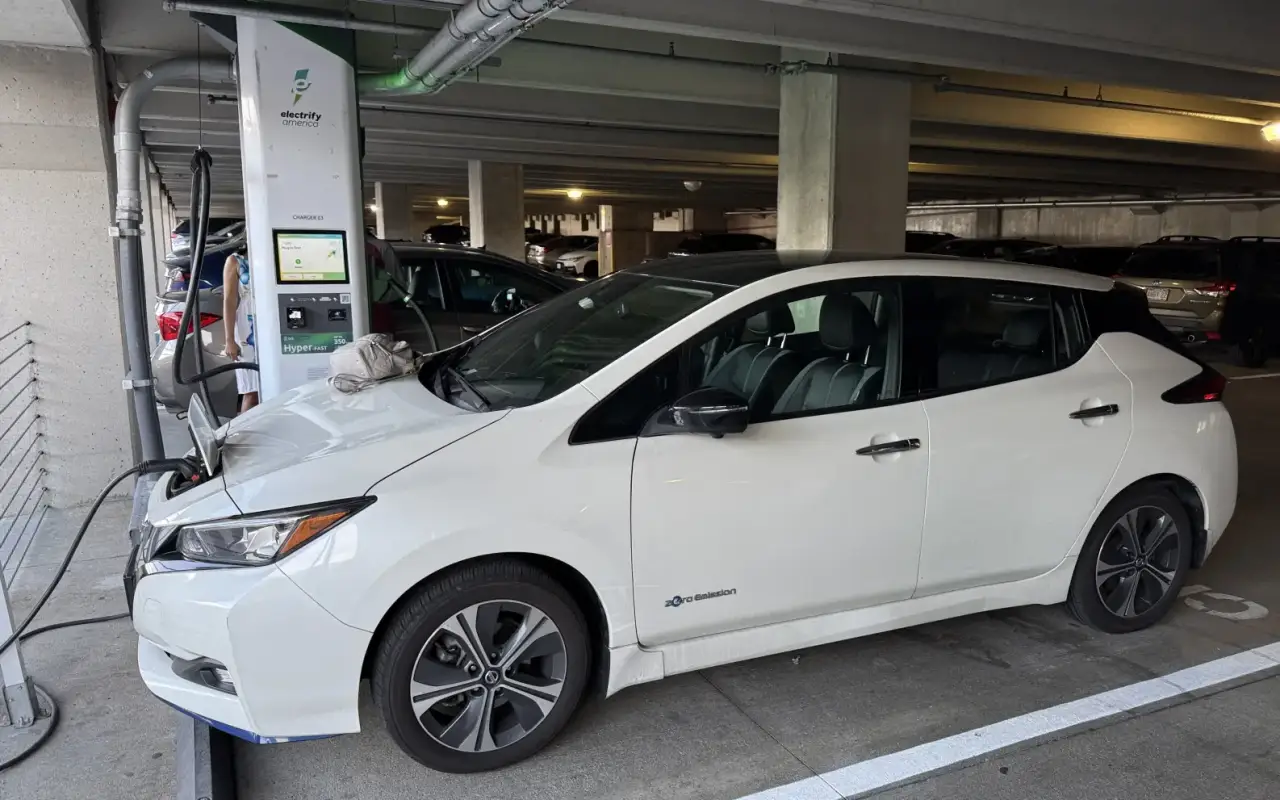
Editorial method: This guide uses primary sources from the DOE Alternative Fuels Data Center and the U.S. Joint Office/ChargeX program. The tables and driver procedures are practical editorial synthesis; they are not a station maker’s official troubleshooting manual. The featured photo depicts a public charging station in Massachusetts and does not imply that this specific charger malfunctioned.
Explore EV Guides and Charging & Batteries for related coverage.
Featured image credit: 4300streetcar, Wikimedia Commons (2025), licensed under CC BY 4.0. Cropping/resizing may be applied by WordPress. This is a real public charging station in Somerville, Massachusetts; it is not presented as a broken unit.


1 comment
Comments are closed on this article.